
Art Guidelines
Thank you for selecting Lucas Color Card to delivery your creative project. Please review these submission guidelines to assure the highest possible print quality.
Art
General
Once you or your designer have determined the look of the card to be printed, please be sure to use professional design software, such as InDesign, Illustrator, or Photoshop to prepare your art submission. Your cards may be comprised of any combination of raster art (scans or digital photography), vector art (created in a drawing program such as Illustrator or CorelDraw), and text elements.
We prefer to receive art files as .pdf (Portable Document File) files. PDF is a container format that may contain any of these image types, preserving their appearance and position. PDF files need to be press-ready and saved for high-resolution printing. Contact us if you have questions about creating your press-ready PDF file.
Please use one of our Customer Design Guides in preparing your art. The guide is included in the email with your Quotation. The guides are the exact size and shape of the card product you have chosen, and clearly show where each element of your design needs to be positioned. We recommend placing the Customer Design Guide in your design application on a separate layer; this will prevent the guide elements from being included in the final design.
Specify whether jobs are to be printed in PANTONE® spot or CMYK process color. Note: Small quantity order spot colors will be converted to CMYK unless otherwise ordered with custom PANTONE ink colors (please ask). When creating black backgrounds, use a rich black color mix of 20% cyan, 20% magenta, 20% yellow and 100% black. Black text should be 100% black only. 100% black is the only thing that should be set to overprint, never overprint white or any other color, as this may create unwanted color blending.
Scans, Images and Photos
Scans, images and photos must be at least 300 dpi at actual card size. Save as CMYK TIFF or EPS format. Provide a layered Photoshop, Illustrator or InDesign file in addition to any flattened TIFF or EPS files used in the layout. Any rotation, skewing or distortion of files should be done in your design application to expedite postscript output. Avoid JPEG files if possible, as JPEG compression introduce distortion.
All images should be linked rather than embedded so that adjustments can be made if needed. Include the linked files at the time artwork is submitted.
Fonts
Include all type fonts when you send the job or convert all type in the document to outlines (Note: converting type to outlines renders the document’s type uneditable). Fonts should be in a platform- neutral format such as TrueType or OpenType. When sending fonts, please put them in a zipped folder to avoid possible corruption.
Card text
Text for card backs should be editable text built in one of the above programs or text that has been converted to outlines. Please avoid providing text as raster images unless special effects are being used. See this document for more about rasterized type.
Bleeds, buffers and die lines
When laying out artwork for plastic cards, keep in mind how the cards are produced. First, the files are sent to an offset or digital printing press. The images are printed onto a paper or plastic substrate, such as Teslin. After lamination is applied to the printed sheets, they are cut out to the finished size and shape. Unfortunately, the die cutting process is not precise, so we ask that you
include:
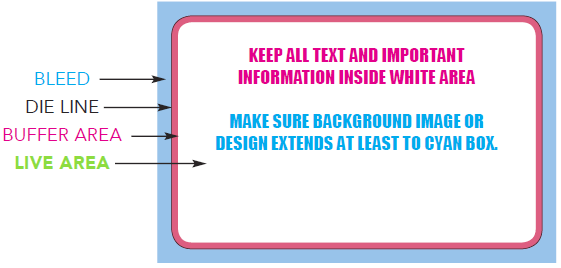
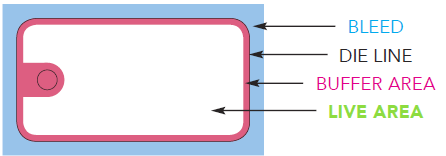
1. A .125” (1/8 inch) BLEED, or background art that extends beyond the intended die line.
2. A .0625” (1/16 inch) BUFFER. The BUFFER is the space between the die line and the LIVE area. It is critical that important information like type or logos not encroach on this BUFFER area, or they run the risk of being cut into when the printed sheets are die cut.
ZONES OF A CREDIT CARD-SIZED CARD
ZONES OF A KEYTAG
Checklist
- Keep all text and important information inside live area
- Make sure background image or design extends at least to the outer edge of the blue box
- Files need to be 300 dpi
- Color mode needs to be CMYK (not RGB)
- Make sure that we will be able to remove die lines (we do not print the die lines at press!)
Compatible file formats
You can submit artwork in any of the following file formats:
- Acrobat PDF
- Illustrator
- InDesign
- Photoshop (but please read this)
PLEASE AVOID THE FOLLOWING:
- Artwork created in Microsoft Office programs such as PowerPoint, Publisher or Word will NOT be accepted.
- PNG (Portable Network Graphic) files are not suitable for printing, as they are RGB files and are generally low resolution. Please remember that printing requires approximately 4 times the resolution needed for internet graphics; logos grabbed from web pages will usually be illegible when printed.
How to get your files to us
We can receive data files from a variety of sources:
- Secure FTP (Instructions)
- PC-formatted CD-ROM or DVD disc (returnable upon request)
Any of the above-mentioned file types may be sent as a file attachment via e-mail. If you’re emailing a data file, please include your order number and company name in the body of the e-mail (acknowledgment of receipt available upon request). Also, please provide the following information:
- Quantity to be produced
- Beginning barcode number
Any of the above-mentioned file types may be sent as a file attachment via e-mail. If you’re emailing
a data file, please include your order number and company name in the body of the e-mail
(acknowledgment of receipt available upon request). Also, please provide the following information:
- Quantity to be produced
- Beginning barcode number
- Ending barcode number
Templates
Data Guidelines
Before you Send:
Data is a critical component of a successful card or mailer program and Lucas is here to help.
Before you send or specify a data range for your card order, please verify:
- The card range has not been used in your program before
- The card number format has the correct number of digits
- The card number will work if a leading zero is used to fill the number of digits
Lucas customers automatically save a history of data used previously.
Mailing Instructions
Lucas Color Card is a full-service mail services provider (MSP). We mail our card products to all 50 states and offer a variety of mail entry discounts, including DNDC, DSCF and DDU. Our full-service mail customers can track their mail in real time as it makes its way through the postal system and arrives at its final destination.
To help us help you ensure your mailer is an unqualified success, please familiarize yourself with our basic data requirements as well as the following mailer-specific instructions.
Presort Services
Presorting mail can lower the per-piece mailing cost and ensure mail pieces arrive at their intended destination. Some of our customers send us mailing lists that have already been presorted using their own software and indicia (stamp), while other customers ask us to process their mail using our software and indicia.
If you plan on presorting your own mail…
You’ll need to send us the appropriate USPS-approved mail documentation so we can process your job. We’ll also need a high-quality image file of your indicia if it’s not already included in the artwork.
If you want us to presort your mailer for you…
There are several options that could affect the cost and effectiveness of your mailer:
- Does your mailer need NCOA processing?
- NCOA is the USPS database of change-of-address orders filed by households and businesses. NCOA processing provides feedback on the accuracy of addresses before mailing so that we can update addresses with current information, remove undeliverable addresses, and delete records that are no longer of interest because the addressee is not part of the intended target audience. Mailers save money on printing, mailing services, and postage, and mail pieces are delivered faster to the intended recipient. NCOA is required for full-service mailings unless the address block includes an alternate recipient (“OR CURRENT RESIDENT” or similar). Under current postal regulations, to qualify for NCOA processing, the mail list owner must complete a special USPS-approved form (the Processing Acknowledgment Form or PAF).
- Do you want us to de-duplicate the list? De-duplication consists in removing duplicate mail records based on one or more criteria. The most common filters are:
- Person. Use this option if you want to remove more than one mailpiece addressed to the same person (i.e., Robert Smith versus Bob Smith at the same address). Compares data in the FIRST, LAST, ADDRESS, and ZIP columns.
- Address. Use if you want only one record for each unique address or company/address in your mailing list. Compares data in the COMPANY, ADDRESS, and ZIP columns. If the company name is blank, it is ignored.
- Household. Use if you want only one mailpiece delivered to an address when more than two people with the same last name share that address. When we remove duplicate addresses, we can also consolidate the addressee into a single household, i.e., Poppa Bear, Momma Bear and Baby Bear would become “The Bear Household.” Compares data in the LAST, ADDRESS, and ZIP columns.
- Do you need full-service mailing? We can presort your mail to obtain lower rates and make your mail pieces fully trackable. But to qualify for those lower rates and full tracking, your mailer must meet several requirements:
- It must either have an alternate recipient or the mail list owner must complete the Processing Acknowledgment Form (PAF)
- Addresses should be concentrated in a limited range of zip codes
- The job must include a minimum of 500 pieces
Mailer File Requirements
The data file you send us must include the recipient’s name and complete address. Also, be sure to identify alternate recipients if applicable (like “CURRENT RESIDENT” or “OCCUPANT”) in a separate column (this format is known as the “exceptional address” format).
Please note that, to ensure data integrity, we cannot modify the data in your files in any way, so make sure that data is correct before sending it to us. For example, if you are sending mail to businesses and private individuals, your “OR CURRENT RESIDENT” field should match, that is, business mail should probably be addressed to “OCCUPANT.”
Please note that if you’ve asked us to process your mailer using our software, the software will optimize and validate each address, so any addresses identified as invalid will be removed, and valid addresses will be formatted to conform to postal regulations. Mail lists that have not been optimized and validated cannot be processed as full-service mail.
Mailer Templates
Our postcard templates may not reflect the latest USPS design requirements. Currently, we know that all postcards require a white knockout area for the address block that should extend at least 3⅝″ (3.625″) from the right cut line (= 3¾″ from the right edge). If 3.625″ is not possible, the absolute minimum is 3.5″. Data that falls outside of the OCR read area (the part of the postcard USPS scanners read) may result in delays or, in extreme cases, additional charges or non-delivery.
Frequently Asked Questions
Why should our card be made from Teslin at it's core?
1. Laminated Teslin, made of Polyester, is more scratch-resistant over time -preserving the customer’s ability to see the artwork beneath with clarity. The “wear and tear” on the surface of a PVC card after 6 months of usage is approximately the same as 12 to 18 months of LAMINATED TESLIN usage.
2. Bar codes are protected under the laminate in a LAMINATED TESLIN card.
3. PVC cards with surface bar codes cannot withstand extended surface scratching – else data miss-reads occur at the point of sale. Protective UV coatings and labels on PVC surface bar codes rub off with moisture and skin oils.
4. TESLIN is a porous substrate, allowing the laminate’s adhesive to be embedded into the Teslin flexible surface for the strongest bond (e.g. cheese melting into the holes on a cracker).
5. LAMINATED TESLIN uses up to 10- mil of polyester/polyethylene (plastic/adhesive) on each side of the product, providing more plastic protection and more adhesive than PVC overlaminates.
6. Laminated Teslin keytags last 5 times longer than a PVC keytag. Colder climates are even harder on PVC keytags because the key ring snaps and the user has to request a new card/keytag. Teslin keytags are known to last 10 years in the field – with very high scanning ability throughout their life.
Do your card products have a warranty for durability?
Our premium laminated Teslin cards and key tag products carry a one year warranty under normal use. Note: Lucas has never had a warranty claim on this product in 28 years.
What is Lucas' standard lead time?
Standard lead time for orders under 100,000 units is 15 working days after all proofs are approved.
Do you offer priority or rush orders?
Yes, we offer both priority and rush orders. However, our ability to guarantee expedited service depends on our capacity at the time of the request.
Priority: 10 working days from signed art approval (rush fee may apply)
Rush: 5 working days from signed art approval (rush fee may apply)
Can I expect the standard lead time if I place a large order?
Lead time for orders of more than 100,000 units will be determined at time of approvals.
How will Lucas protect my data?
Lucas is a medium-security card manufacturer. We adhere to the following security practices to safeguard personally identifiable information (PII) and other proprietary data:
- All discarded documents and materials with customer data are shredded throughout pre-production, production and post-production.
- On request, data files can be deleted from our system after shipping in accordance with specific protocols.
- No data is sent offsite at any time.
- No production is done offsite at any time.
- Mailed materials usually go to trusted third-party shippers for transport to USPS drop ship locations.
- The on-premises Lucas FTP server uses SFTP.
- Only users with admin-level privileges have access to customers’ SFTP folder and our physical server room.
- Cameras monitor all entrances and exits as well as all production areas 24 hours a day.
Can I receive samples of my order?
As a courtesy to our customers, our standard practice is to ship a maximum of 25 samples to the client at no extra charge when the order ships. For more than 25 samples, please see your sales representative to calculate additional cost.
How do I know when my order has been accepted?
You will receive an email confirming your order once the order has been turned in to production.
How can I check the status of my order?
Clients can check the status of their order by using Lucas On-Line, emailing customer service at service@lucascolorcard.com or by calling 888-84-LUCAS (58227).
How will I know when my order ships?
Shipping notifications are sent via email the day the product ships. The notification will include the shipment company used and tracking numbers if applicable.